
Web application development
Browser-based software for planning, requests or administration. Start with one workflow, clear user permissions and a first release your team can test.
When does a custom web application make sense?
A web application is software accessed through a browser. Users can process requests, plan projects or update records. Information is stored centrally, without installing a desktop program on every workstation.
Custom development can be useful when existing software does not fit your workflow. Your administration might be spread across spreadsheets and email, or field staff may need the same up-to-date information as the office team.
We first consider whether existing software solves the problem. Where custom development fits, we define one complete user journey. This creates a manageable first release and a concrete basis for testing and budgeting.
From separate lists to one workflow
Illustrative workflow: a request from arrival to completion. This is a possible design for your organisation, rather than a claim about a completed client project.
- A team member records a request with the necessary customer information.
- An assigned colleague processes the request and updates its status.
- Other authorised staff can see what is missing and which action comes next.
- After completion, authorised users can consult the history.
We define who can perform each step, where the information comes from and what happens when a request changes or is cancelled. Those exceptions matter to day-to-day usability.
A real example: project work in AdComPro
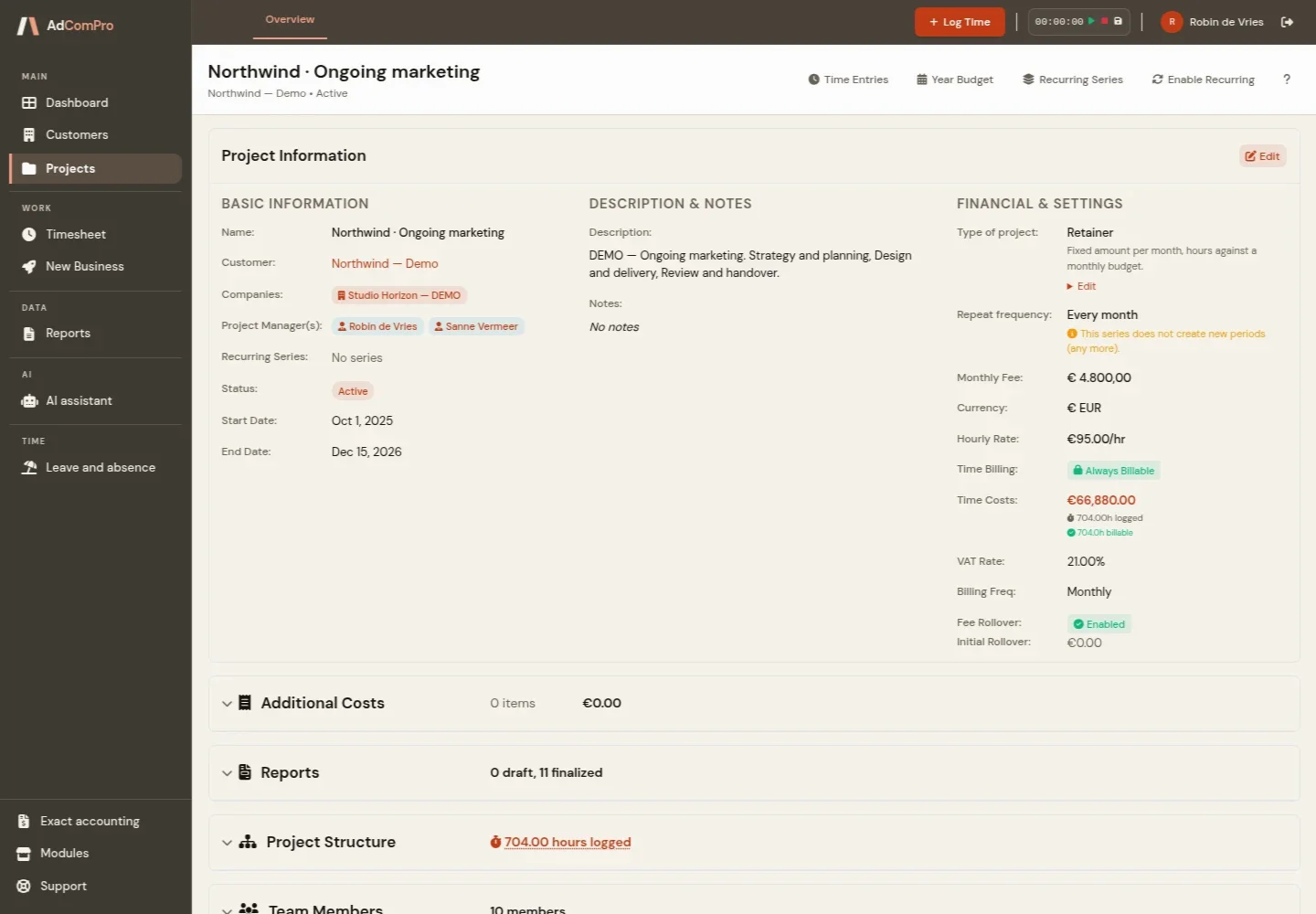
Project information in one place
Our own product AdComPro is a web application covering projects, time tracking and invoicing. Its project overview shows budgets, progress and team members. Staff record time; approved hours can become a draft invoice, which is reviewed before finalisation.
The public screenshot uses demo data. It illustrates how tasks connect within one application. For your business, we identify the necessary functions; a first release does not need to reproduce this entire product.
Website, internal application, customer portal or SaaS?
- Website: presents your business and helps visitors find information or contact you. Explore website development.
- Internal web application: supports your team’s planning or administration. If a spreadsheet is the starting point, explore replacing Excel with an application.
- Customer portal: gives existing customers private access to their information and actions. Explore customer portal development.
- SaaS product: serves multiple customer organisations, often through subscriptions. It also needs onboarding, organisation boundaries and billing. Explore SaaS development.
How much does a web application cost?
Cost depends on workflows, user roles, data sources and integrations. These indicative budgets match our defined service scopes; they are not prices for a complete business platform.
- Small internal application: €2,500–€5,000 excluding VAT. One simple spreadsheet-based workflow, up to two roles, straightforward calculations and one clean data source. No API integrations or complex macros.
- Compact customer portal: €7,500–€15,000 excluding VAT. One customer workflow, two roles and manual administration or one agreed, simple read-only integration.
- SaaS MVP: €15,000–€30,000 excluding VAT. One audience and core workflow, organisation accounts, limited roles and one subscription plan through an established payment provider.
Hosting, maintenance, external licences, payment fees and data migration are budgeted separately. Multiple complex integrations, native apps and extensive approval processes require additional scope. After assessment, you receive a quotation with features, exclusions, schedule and acceptance criteria.
How we build a useful first release
- Workflow and scope: discuss current tasks, sample data, users and exceptions.
- Screens and agreements: review the main user journey before every feature is implemented.
- Build and verify: test tasks, input validation and access rules, including direct requests for unauthorised records.
- Rollout: test with a small group, agree data transfer and administration, and collect improvements.
The schedule follows the scope and availability of feedback and data. Maintenance, backups, recovery and monitoring are agreed explicitly. We also document arrangements for source code, access and handover.
Technology matched to the workflow
Laravel can provide a suitable foundation for a custom application. Interface, database and hosting choices depend on the workflow, existing systems and maintenance requirements. Explore Laravel development.
An integration starts with reviewing available access, data quality and supplier requirements. We identify the authoritative source and decide how failures should be reported.
We design the agreed mobile journeys for small screens. If offline use, background tasks or specific device capabilities matter, we first assess whether a browser solution is sufficient. A separate app requires its own assessment and scope.
Frequently asked questions
How long does web application development take?
The schedule depends on the workflow, integrations and feedback. After defining the first release, we provide a schedule with concrete delivery points. Additional workflows are estimated and planned separately.
Can we start small and expand later?
Yes. We choose one complete workflow and consider likely next steps. Later features are assessed against actual use, technical impact and budget; expansion may also require changes to the existing design.
Will it work on phones and tablets?
We design and test the agreed journeys for mobile, tablet and desktop. Specific requirements such as offline use or device integrations are assessed separately.
Can existing data be transferred?
Often, but this requires checking source data, field mapping and quality. We agree what should move, perform a trial import and review the result. Data migration is budgeted separately.
What do you need for an initial estimate?
A description of the workflow, user roles, existing systems and an anonymised example of the current administration. These help define a useful first release.
Explore custom software for your organisation for the broader choice between existing tools and a custom solution.
Discuss your web application
Tell us which task you want to improve, who will use the software and where the information lives today. We can then explore a suitable first release.