
Customer portal development
Give customers one place for their information, documents and request status. A custom portal with clear permissions and a manageable first release.
A customer portal built around your workflow
A customer portal is a private online environment where customers view information or complete tasks. They might submit documents, follow a request or check their details. Your team manages the information and controls access.
We start with a concrete journey: what do customers repeatedly ask by email, which information already exists in your systems, and which task could they complete themselves? Those answers define the first release.
A real example: the CasaMio guest portal
In our own product CasaMio, guests use a unique link and four-digit PIN to access booking information such as arrival and Wi-Fi instructions. This is a portal designed around a specific customer relationship: a reservation.
That access method belongs to this particular product. For your portal, we choose authentication based on the information and actions involved, such as personal accounts with additional verification.
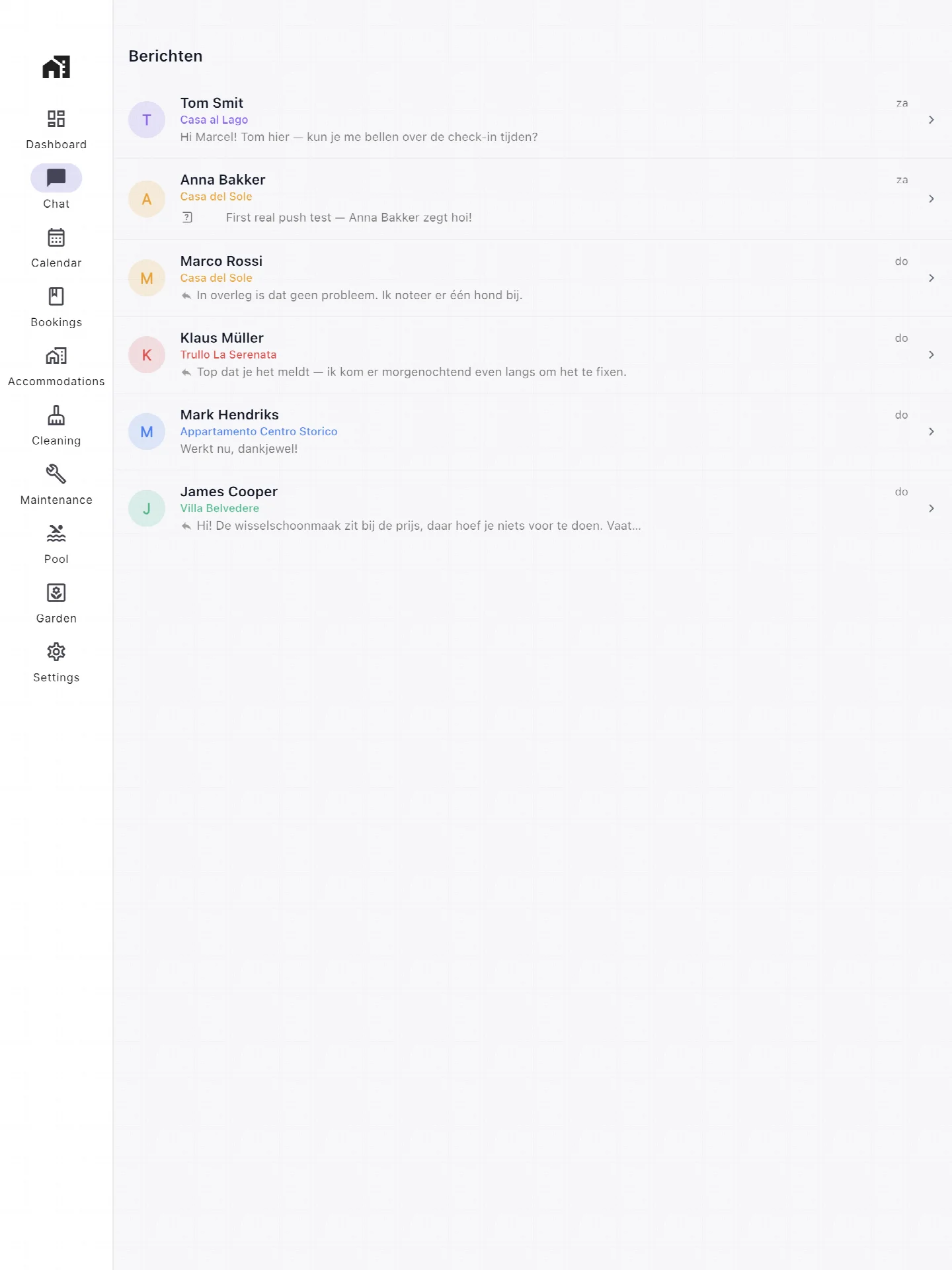
Guest communication in the admin environment
This public CasaMio product image shows the administrator’s message inbox: the team’s view of guest communication. It illustrates how messages can sit alongside the booking workflow.
For your first portal, we decide whether messaging is necessary or whether clear status information and documents already answer the main questions.
Who can see and change what?
Match access to each person’s task
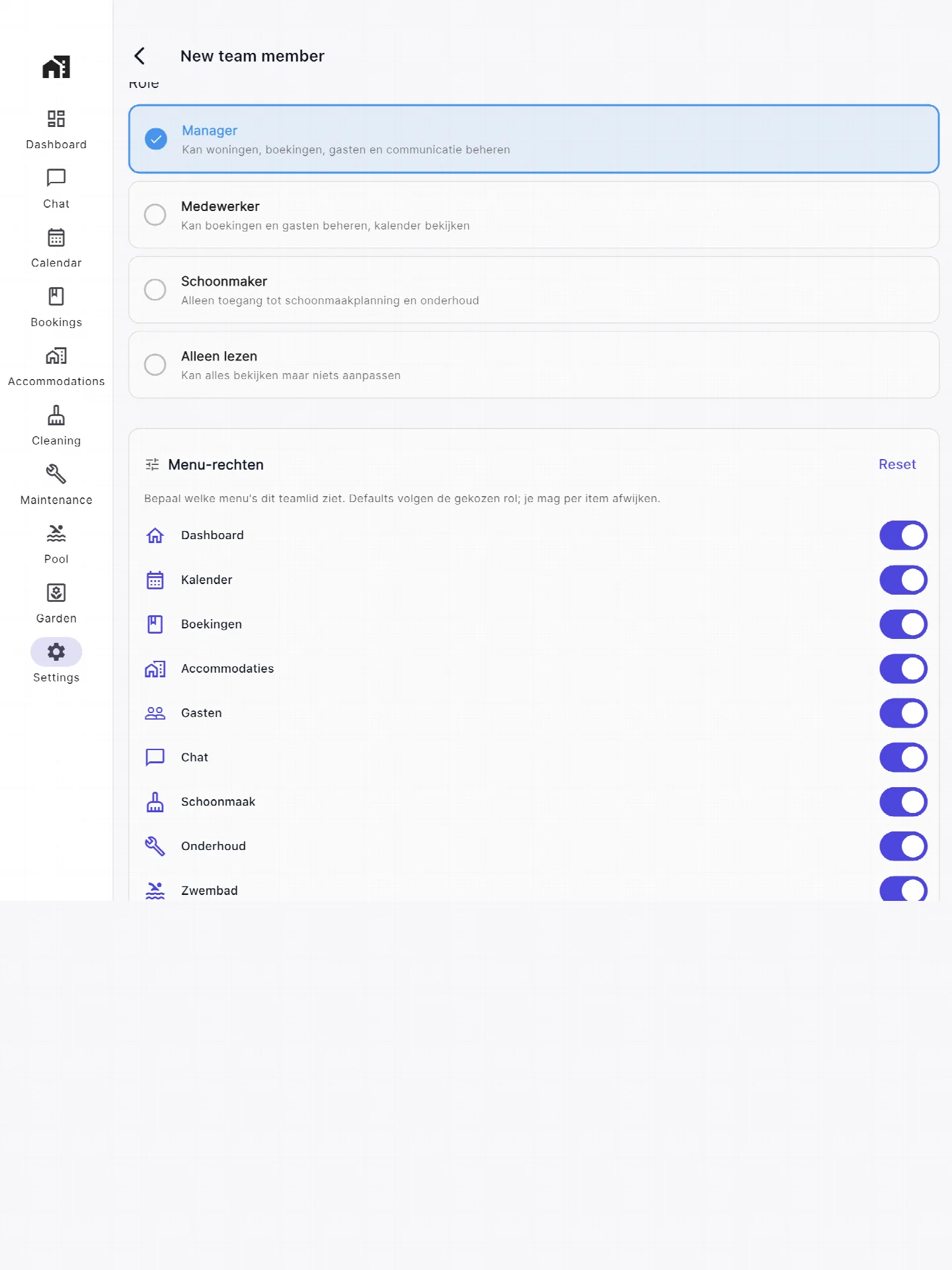
CasaMio provides team roles including manager, staff, cleaner and read-only. The screenshot shows team roles and access to menu sections. A customer portal also needs rules defining which customer can access each record.
For a new portal, we map permissions explicitly: customers see their own information, staff handle assigned requests and administrators manage access. We test these permissions on the server, including direct links and revoked access.
A manageable first release
- Sign-in and two roles: customer and administrator.
- One customer workflow, such as following a request and viewing its documents.
- An admin screen for updating customer information and status.
- One data source: manual administration or an agreed, simple read-only integration.
- Mobile-friendly user journeys and agreed tests for permissions and data separation.
We decide where information is maintained so your team does not have to update two systems. If an integration is unavailable, the interface should make the freshness of the displayed information clear.
How much does a customer portal cost?
Our indicative budget for a compact customer portal is €7,500–€15,000 excluding VAT. This covers the limited first release above, with one workflow and two roles. A defined scope leads to a concrete quotation.
Multiple data sources, complex write integrations, online payments, single sign-on and extensive approval workflows are outside this indication. Hosting, maintenance, external licences and data migration are budgeted separately.
The main cost factors are what users can do, source-data quality and integrations. We therefore map one complete customer journey, including exceptions such as revoked access or missing documents.
From recurring questions to a working portal
- Choose the customer workflow that would benefit most from clearer information.
- Define its screens, data, roles and notifications.
- Build the journey and test it with a small group.
- Roll out access, explain administration and collect improvements.
Planning to sell the software to multiple businesses as a subscription? Explore SaaS development. We can also use Laravel for a custom application.
Frequently asked questions
Can you connect the portal to our existing software?
Yes, where the source system provides suitable access. We review its API, permissions, data quality and supplier fees. Reading data from one system is a different scope from writing changes back to several systems.
Can customers upload documents?
Uploads can be part of the chosen workflow. We agree file types, size limits, retention and access rules, then include upload processing and protection in the design and quotation.
Will the portal work on mobile?
Yes. We design the agreed journeys for phones and desktop browsers. A separate native app is outside the stated budget indication.
How do you address privacy and access?
We limit access to necessary information and document who can perform each action. Hosting, retention, logging and responsibilities are agreed as part of the project. Specific measures depend on the data involved.
Preparing your project
Discuss your first version
Tell us who will use the software, which task it should support and which systems are involved. That gives us a useful starting point for a scoped proposal.