
Replace Excel with an application
One central administration with user permissions and reliable records. A small first version from €2,500 excluding VAT, with a fixed quote after review.
When is an application a better fit than Excel?
Replacing Excel with an application means moving your data, calculations and workflow into a web application with one central database. People work in their browser with individual accounts and permissions. Excel exports can remain part of the process.
Excel is useful for calculations, analysis and small overviews. A replacement becomes worth considering when several people maintain the same records, retype data or depend on formulas that only one colleague understands.
Altena Digital builds custom software around that existing workflow. We start with the spreadsheet and the people using it, so we understand what the application needs to take over.
Does this sound familiar?
Multiple versions
The plan is on a shared drive, but an updated copy is in someone’s inbox. An application gives everyone access to the same current records.
Fragile calculations
Formulas, references and macros determine the results. We document that logic and test the new calculations against agreed examples.
Duplicate entry
Orders, hours or customer details move between spreadsheets and other software. An API integration can retrieve those records directly from the source.
What changes for your team?
Take project administration: people record time against a project, a manager reviews it and the finance team uses the approved records. Reports no longer need to be assembled from separate files each time.
The features depend on your workflow. They might include validation, user permissions, a change history, reports and connections to accounting or CRM software. A customer portal can give customers access to relevant information.
We agree which records and actions belong in the first version. A focused administration tool is a different project from a complete business application.
See an example: AdComPro
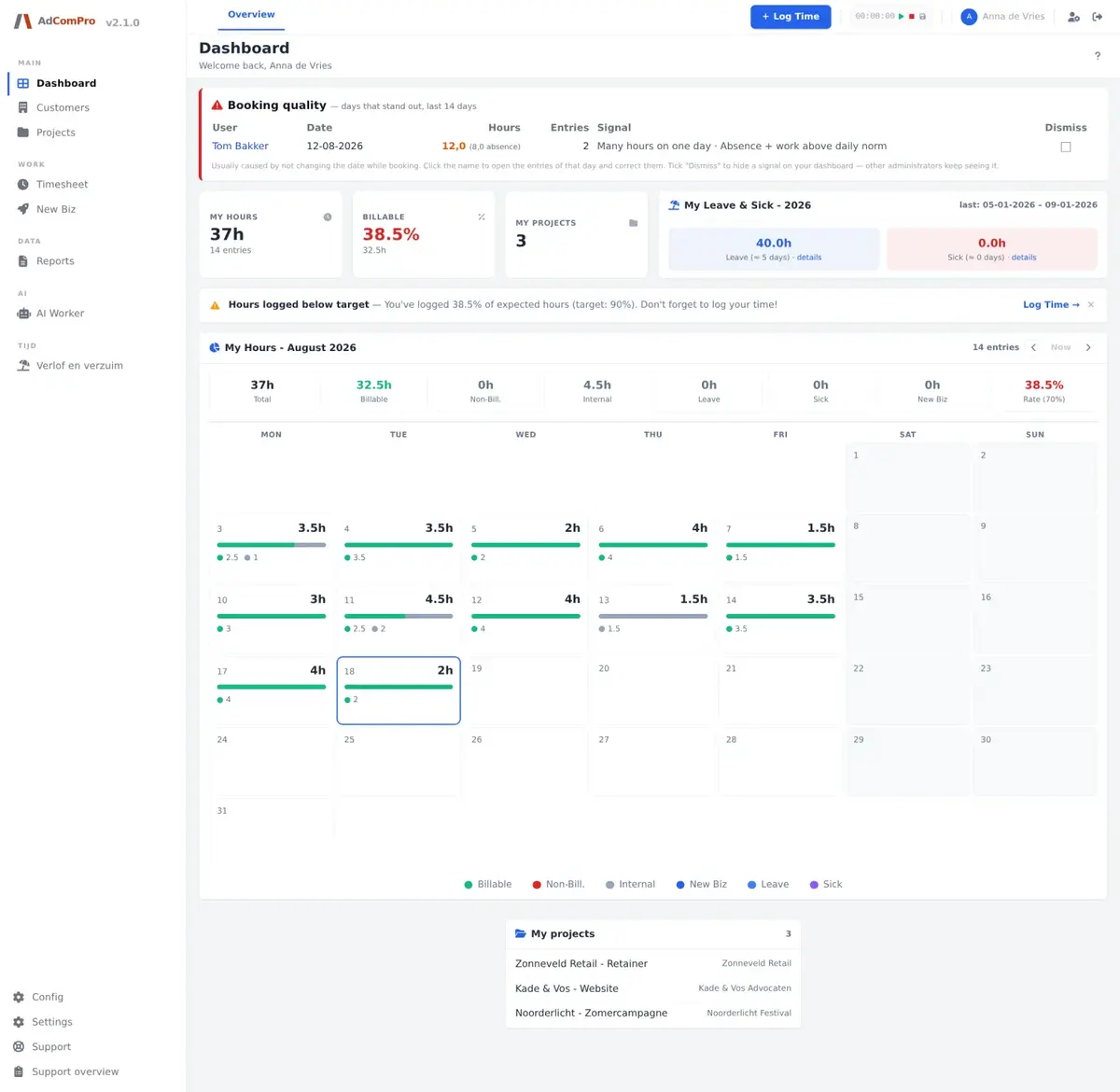
Our own product AdComPro connects projects, time, budgets and invoicing. The dashboard above shows how information comes together in a single application.
Follow one recorded hour: it belongs to a task and a project, contributes to budget tracking and provides a basis for invoicing. This is the kind of connection otherwise maintained through separate files and manual checks.
AdComPro is an existing Altena product, not a case study of a particular Excel migration. If an existing product fits your process, we discuss that first. A different workflow may call for a custom application.
From spreadsheet to tested application
- 01
Understand the file and workflow
We review worksheets, formulas, macros, data sources and users. You identify the results that must match and the exceptions that matter.
- 02
Define the first version
Together we select one usable workflow. Screens, permissions, integrations and acceptance criteria define the scope of the first phase.
- 03
Test the records and calculations
We run a trial import and compare record counts and results with agreed reference data. Duplicates, missing fields and differences are reviewed before migration.
- 04
Switch over and hand over
We plan when the spreadsheet stops being the source of truth. Backups, the final import, checks, training and a fallback procedure form part of the migration plan.
What does replacing Excel cost?
Indicative budget: €2,500 to €5,000 excluding VAT for a small first version. This covers one focused workflow, simple input screens and calculations, up to two user roles and an import from one cleaned Excel file. Complex macros and external integrations fall outside this starting scope.
For additional workflows, approvals or one clearly defined API integration, €5,000 to €10,000 excluding VAT is a useful budget indication. Multiple source systems, complex calculations or a larger business application require a separate estimate.
These are indicative one-off development budgets, not unconditional package prices. Hosting, maintenance, external licences and extensive data cleanup are excluded. After reviewing the file, we provide a fixed quote for the agreed scope.
A reliable estimate requires a look at the spreadsheet. The number of worksheets says little: a small file can contain complex macros, while a large set of records may be straightforward to import.
- Calculations: formulas, macros and exceptions to rebuild.
- Users: permissions, approvals and access to records.
- Data: cleanup, historical records and import checks.
- Integrations: available APIs, data flows and error handling.
You receive a proposal with a fixed price for the agreed phase. Hosting, maintenance and any third-party licences are listed separately. Read how we define scope and pricing.
Start by describing what the file does, how many people use it and which systems are involved. Please do not include customer records in the contact form; we will agree how to review a sample file.
Frequently asked questions
What does an Excel replacement application cost?
A small first version has an indicative budget of €2,500 to €5,000 excluding VAT. Additional workflows or one clearly defined API integration have an indicative development budget of €5,000 to €10,000 excluding VAT. Hosting, maintenance and external licences are separate. The final quote depends on the agreed scope.
Do I need to document every formula and macro myself?
No. We review the calculations and actions together. VBA macros do not automatically become browser features: we identify which logic to retain, replace or remove.
Can my existing data be migrated?
That forms part of the migration plan. We agree which records and history to transfer, perform a trial import and check the results before switching over.
Can I still export to Excel?
Yes, as part of the agreed functionality. Excel can remain useful for individual analyses and reports while the application holds the central records.
When is custom software unnecessary?
If Excel works well for a small group, improving the spreadsheet may be enough. An existing software product may also support your workflow. We consider those options before proposing a new application.
How long does it take?
Four to eight weeks is a typical starting point for a focused first version. The final schedule depends on calculations, integrations, data quality and the time needed to test together.
Who owns the software and data?
You own the custom code and data. We also agree how documentation, access, hosting and maintenance are handed over. Read more about our approach.
Preparing your project
What does your spreadsheet do for your business?
Describe the workflow, the users and where things go wrong. We will outline the options and the steps towards a reliable application.